
Yes — you can cancel a free trial before it ends. In fact, that’s exactly what free trials are built for: try the service, and if it’s not for you, cancel before the first payment is taken. In most cases you keep full access until the trial’s end date, so cancelling early costs you nothing.
The one thing that catches people out is the deadline. On iPhone and Android, you need to cancel at least 24 hours before the trial runs out. Leave it to the last few hours and the payment can go through even though you meant to cancel. Cancel a day early and you’re safe.
The 24-hour rule most people miss
Apple and Google Play both work the same way: a free trial is really a subscription with a delayed first payment. When you sign up, your card or payment method is already on file, and the system is set to charge you the moment the trial ends. The payment is processed 24 hours before the renewal date, which is why both companies tell you to cancel at least a full day ahead.
That means a 7-day trial that starts on a Monday needs to be cancelled by the Saturday before it ends — not on the Sunday, and definitely not on the Monday morning when the charge is already going through. The same rule applies to trials you start on a service’s own website, although some let you cancel closer to the deadline. Don’t count on it. Treat 24 hours as the hard cutoff everywhere.
Before you start any trial, find the end date first. It’s in the sign-up email, on the app’s account page, or in your phone’s subscription list. Write it down and set a reminder for the day before — that’s the single best habit for free trials.
What happens after you cancel a free trial?
With most services, nothing changes straight away. You keep using everything until the trial’s end date, and then access simply stops. Netflix works this way: cancel during a trial and you can keep watching until the trial ends, and you won’t be charged again unless you restart the account.
Some services cut access the moment you cancel. Amazon Prime is one example — if you cancel a Prime trial, your access usually ends around the time you cancel rather than running to the end of the trial. Check the confirmation screen when you cancel: it tells you the exact date your access ends, so there are no surprises.
Either way, cancelling stops the payment. That’s the part that matters. And if you change your mind, most services let you restart the trial or sign up again before the end date — though the free period is usually only for first-time users.
How to cancel a free trial on iPhone
If you started the trial through the App Store, only Apple can stop the payment — cancelling on the service’s own website won’t help.
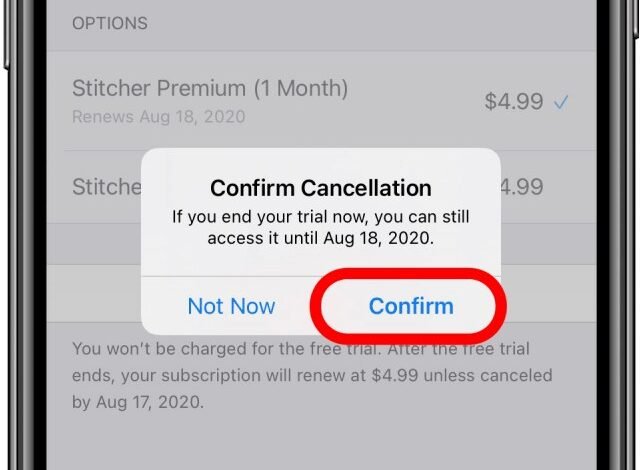
Open Settings and tap your name at the top. Tap Subscriptions, find the trial in the list, then tap Cancel Free Trial and confirm. That’s it. You usually keep access until the trial’s end date. Apple’s own help page says to cancel at least 24 hours before the trial ends if you don’t want to be charged.
If you don’t see the trial in your subscriptions list, you probably signed up directly with the service instead of through Apple. In that case, cancel on the service’s website or in its app.
How to cancel a free trial on Android
If you started the trial through Google Play, open the Play Store, tap your profile picture, then go to Payments & subscriptions and tap Subscriptions. Pick the trial, tap Cancel subscription, and follow the prompts.
Just like Apple, you need to cancel at least 24 hours before the trial ends to avoid being charged. You keep access until the trial’s end date. And deleting the app from your phone does not cancel the trial — the subscription lives in your Google account, not on your home screen.
How to cancel a free trial on the web
If you signed up on a service’s website, log in on a browser and look for the account, billing or membership page. The cancel option is usually under Membership, Billing or Manage subscription. Netflix, for example, has a dedicated page at netflix.com/cancelplan — sign in, click Cancel, and confirm.
If you paid through PayPal, there’s a second place to check. Log in to PayPal, go to Settings, then Payments, then Manage automatic payments, and cancel the agreement there as well. That stops PayPal from sending money even if the service’s own cancel step didn’t go through properly.
Once you’ve cancelled, look for a confirmation email. If you don’t get one within a few minutes, go back and check that the subscription actually shows as cancelled — don’t just assume it worked.
Deleting the app does not cancel the trial
This is the most expensive misunderstanding in free trials. Deleting an app from your phone removes the icon. It does nothing to the subscription behind it. The trial keeps running, the renewal date arrives, and the charge goes through — and you won’t even have the app to remind you.
The same goes for signing out of the app. The only thing that stops the payment is cancelling the subscription itself, in the place where you started it: Apple subscriptions, Google Play subscriptions, PayPal automatic payments, or the service’s own account page.
What to do if the trial charged you anyway
First, cancel the subscription straight away so it doesn’t charge you again next month. Then ask for a refund. Both Apple and Google Play have a refund request process — on iPhone it’s through reportaproblem.apple.com, and on Android it’s through Google Play support. Ask as soon as you notice the charge; the sooner you ask, the better your chances.
It also helps to know where you stand under Australian law. Under the Australian Consumer Law, a company’s “no refunds” policy doesn’t override your consumer guarantees — if a service wasn’t as described, wasn’t delivered properly, or had a major problem, you can still be entitled to a refund. A change of mind alone doesn’t guarantee one, but a charge you never agreed to is a different story. If the company won’t help, you can dispute the charge with your bank — our guide to disputing a direct debit covers the same process for card payments.
There’s also change coming. Parliament passed a ban on subscription traps on 2 July 2026, and it starts on 1 July 2027. From then on, businesses offering subscriptions in Australia will need a clear, straightforward way to cancel. Until then, the 24-hour rule and a calendar reminder are your best protection.
How to never pay for a free trial you forgot about
A few small habits make forgotten trials almost impossible:
- Set a reminder the day you sign up. The moment the trial starts, add a calendar reminder for the day before it ends. Call it something obvious, like “Cancel trial or keep?”
- Cancel right after signing up. If you only want to try something for a week, cancel the trial five minutes after starting it. You keep access until the end date, and there’s nothing left to forget.
- Check your subscriptions once a month. Open your iPhone’s Subscriptions page or Google Play’s Subscriptions list and look at what’s active. Anything you don’t recognise gets cancelled on the spot.
- Read the trial terms before you tap. Check how long the trial runs, what it costs after that, and whether cancelling ends access immediately. If the terms are hard to find, that’s a warning sign.
For the full step-by-step process across every service, see our guide on how to cancel a subscription.
Free trial cancellation FAQ
Can you cancel a free trial immediately after signing up?
Yes. You can cancel a free trial minutes after starting it, and you usually keep access until the trial’s end date. It’s the safest way to try something without risking a forgotten charge.
Do you lose access straight away when you cancel a free trial?
Usually not. Most services — including Netflix and most app subscriptions — let you keep using everything until the trial ends. A few, like Amazon Prime, may end access at the time you cancel, so check the confirmation screen.
Can you get a refund if a free trial charged you?
Sometimes. Ask for a refund through Apple or Google Play as soon as you notice the charge, and cancel the subscription so it doesn’t renew. If the charge was a mistake or the service wasn’t as described, Australian Consumer Law may also give you a right to a refund.
Does deleting the app cancel the free trial?
No. Deleting the app only removes it from your phone. The subscription keeps running and will charge you unless you cancel it in your Apple subscriptions, Google Play subscriptions, or the service’s own account page.
Can you start the same free trial twice?
Almost never. Free trials are for first-time users, so once you’ve used one, signing up again usually starts a paid subscription straight away. Some services let you restart within a short window after cancelling, but the free period doesn’t reset.