

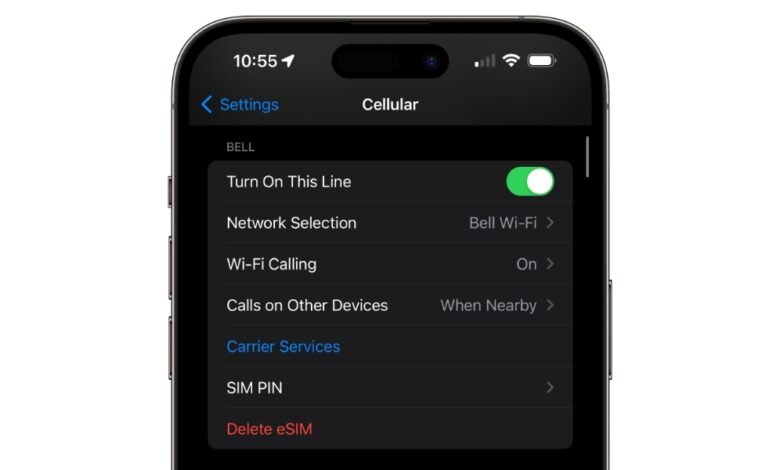
An eSIM is a digital SIM built into your phone. It does exactly the same job as the little plastic SIM card you are used to — it connects your phone to your mobile network for calls, texts and data — except there is no card to insert, lose or swap. Instead, your carrier sends your plan to the phone as a download, usually through a QR code or their app.
Quick answer: If your phone supports eSIM, you can switch plans or carriers without waiting for a SIM card in the post. You scan a code, the plan downloads in a few minutes, and you are connected. Telstra, Optus and Vodafone all support eSIM on current phones, as do most smaller providers. Telstra’s eSIM page explains how it works on their network.
What is an eSIM?
eSIM stands for embedded SIM. It is a small, programmable chip that is soldered into your phone when it is made. A normal SIM card holds your carrier’s details on a piece of plastic. An eSIM holds the same details as software on that built-in chip.
Because it is software, an eSIM can be rewritten. When you change plans or carriers, your phone simply downloads a new profile. You never touch a SIM tray, and you never need the little ejector pin that always seems to go missing.
Your phone number, plan and network stay the same. Only the way the phone identifies itself to the network changes.
How does an eSIM work?
Setting one up takes a few minutes and a Wi-Fi connection:
- You choose a plan and pick eSIM instead of a physical SIM at checkout, or ask your current carrier to convert your existing service to eSIM.
- Your carrier sends you a QR code, an activation code, or a prompt inside their app.
- You scan the code or follow the prompts. Your phone downloads your carrier’s profile from their server onto the eSIM chip.
- You turn the line on in your phone’s settings and pick it for calls, texts and mobile data.
On an iPhone, that is Settings > Mobile > Add eSIM. On most Android phones it is Settings > Network & internet > SIMs > Add eSIM. If you are already on a physical SIM with Telstra, you can convert it to eSIM in Settings or through the My Telstra app, and your number and plan do not change.
eSIM vs physical SIM
| eSIM | Physical SIM | |
|---|---|---|
| What it is | Chip built into the phone | Removable plastic card |
| Setup time | Minutes, by QR code or app | Days waiting for delivery, or a trip to a store |
| Switching plans | Download a new profile | Wait for a new card in the post |
| Multiple numbers | Store several profiles on one phone | One number per card (unless the phone has two trays) |
| If the phone is lost | Can’t be pulled out of the phone | Can be removed and used in another phone |
| Works in | Most phones made since 2018–2020 | Almost any phone |
Which phones support eSIM?
Most phones made in the last few years support eSIM. As a rough guide:
- iPhone: iPhone XS and XR (2018) onwards, including the iPhone 11, 12, 13, 14, 15 and 16 ranges.
- Samsung Galaxy: Galaxy S20 series onwards, plus recent Galaxy Z Fold and Flip models.
- Google Pixel: Pixel 3 onwards.
- Other Android: many newer Motorola and other brands — check before you buy.
Telstra says most devices made after 2020 are eSIM compatible. One catch: a phone bought overseas may not support eSIM on Australian networks, so check the exact model first.
How to check if your phone supports eSIM
The quickest test works on most phones: dial *#06#. If an EID number shows up, your phone has an eSIM chip. (The EID is the chip’s own ID number.)
You can also check in settings. On an iPhone, go to Settings > General > About and look for an EID or a Digital SIM entry. On a Pixel, look under Settings > About phone > SIM status.
How to get an eSIM in Australia
All three big networks support eSIM, and there is no extra charge for choosing it over a physical SIM:
- Telstra: All Upfront and Pre-Paid plans work with eSIM. Activate through the My Telstra app, a QR code, or a six-digit carrier activation code. Number transfers usually land within about four business hours.
- Optus: eSIM is available from the iPhone 12 series, Galaxy S20 series and Pixel 4 onwards, plus newer Motorola handsets.
- Vodafone: Pick eSIM at checkout online or in the app, and activation usually takes a few minutes. Vodafone also supports NumberSync, which puts your number on a cellular smartwatch without a second plan.
Most smaller providers — MVNOs — support eSIM too, including Amaysim, Boost Mobile, Felix, Kogan Mobile, Lebara and Spintel. If you are switching providers and keeping your number, the port works the same way as with a physical SIM, only faster, because there is no card to wait for. Our guide to keeping your number when switching mobile providers walks through the steps.
Dual SIM: two numbers on one phone
This is where eSIM is genuinely handy. One phone can hold several eSIM profiles, and most eSIM phones can run two lines at once — for example, your physical SIM for one number and an eSIM for another.
People use it to keep a work number and a personal number on the same handset, or to run a cheap data-only plan alongside their main number. An iPhone can store eight or more eSIMs, though only one can be used for mobile data at a time.
Using an eSIM when you travel
Instead of buying a local SIM at the airport, you can buy a travel eSIM before you leave, scan the code at home, and land already connected. Your Australian SIM stays in the phone for calls and texts, while the eSIM handles data.
Travel eSIMs are usually data-only, so they don’t give you a local number. For a short trip they are often far cheaper than your carrier’s roaming pass, but check the price before you buy — and remember your carrier’s roaming pass keeps your Australian number working for calls, which a data-only travel eSIM does not.
Pros and cons of eSIM
The good:
- No waiting for a SIM card in the post, and no trip to a store.
- Switching plans or carriers takes minutes.
- Two numbers on one phone, with no second SIM tray needed.
- Nothing to lose, snap or misplace.
- A thief can’t pull the SIM out of a stolen phone to dodge tracking.
- Less plastic and packaging.
The not-so-good:
- Not every phone supports it — older handsets still need a physical SIM.
- Moving to a new phone means transferring the eSIM through your carrier’s app or a new QR code, not just moving a card across.
- If your phone breaks, getting the eSIM back usually means contacting your carrier.
- A few smaller providers still don’t offer eSIM, so check before signing up.
Is an eSIM safe?
Yes — an eSIM uses the same security standards as a physical SIM. The risk is not the chip itself, but how carriers check who is asking for a swap. Since 30 June 2022, Australian rules have required telcos to run stronger, multi-factor identity checks before approving a SIM or eSIM swap.
Those checks matter. In September 2026, Telstra paid the regulator $277,200 after its own staff skipped required identity checks during fifteen unauthorised SIM swaps. If someone ever asks you to approve a SIM change you didn’t request, don’t — contact your carrier straight away.
You can also set a SIM PIN on your eSIM, just as you could on a physical SIM, so the line can’t be used without it.
Should you switch to eSIM?
If your phone supports it, there is little reason not to. It costs nothing extra, setup takes minutes, and it makes switching plans and travelling easier. The main reasons to stay on a physical SIM are an older phone that doesn’t support eSIM, or a provider that doesn’t offer it yet.
If you are buying a new phone anyway, you will probably end up on eSIM by default — carriers now nudge most new sign-ups that way. And if you swap phones often, just remember the transfer step: sort the eSIM move in your carrier’s app before you wipe the old phone.
Frequently asked questions
Does an eSIM cost extra?
No. Telstra, Optus and Vodafone charge the same for eSIM as for a physical SIM, and switching an existing service to eSIM is free.
Can I keep my phone number with an eSIM?
Yes. Porting your number to an eSIM works the same as porting to a physical SIM, and it is usually faster because there is no card to post. Don’t cancel your old service first — the port moves the number for you.
What happens to my eSIM if I get a new phone?
You transfer it. On iPhone, eSIM Quick Transfer can move it from your old phone during setup, or your carrier’s app can issue a new QR code. A physical SIM just moves across; an eSIM needs that transfer step.
Can I use an eSIM and a physical SIM at the same time?
Yes, on most eSIM phones. That is dual SIM: for example, your main number on the physical SIM and a second number or a travel data plan on the eSIM.
Does eSIM work on prepaid plans?
Yes. Telstra, Optus, Vodafone and most MVNOs offer eSIM on prepaid as well as postpaid plans.
Can I go back to a physical SIM after switching to eSIM?
Yes. Your carrier can issue a physical SIM for the same number and plan. You may need to visit a store or wait for one in the post.