

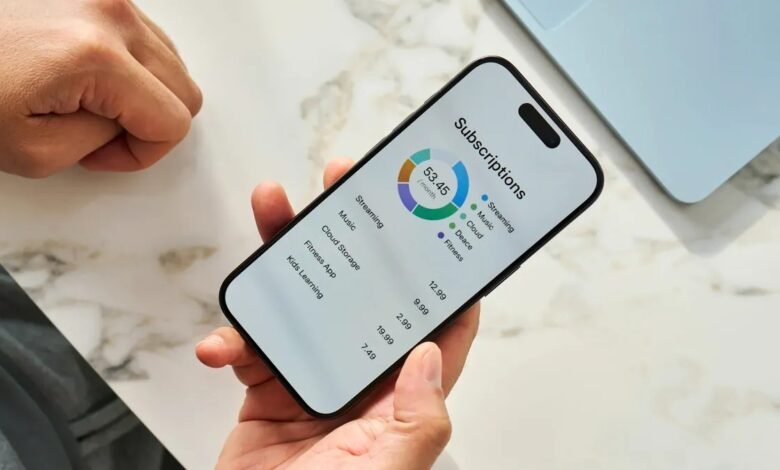
Most of us pay for more subscriptions than we can name. Streaming, music, cloud storage, fitness apps, news, software — they quietly renew every month, and the small amounts add up to hundreds of dollars a year. A survey of Australian millennials cited by WeMoney found 66% had subscriptions they had forgotten about, and more than half were paying for between four and ten at once.
A subscription tracker app puts the whole list in one place, shows what it all costs, and warns you before each renewal. Some find your subscriptions automatically by reading your bank transactions. Others keep it simple: you type them in yourself, and nothing touches your bank account.
Quick answer: For most Australians, WeMoney is the best place to start — it is free, made for Australian banks, and finds forgotten subscriptions on its own. If you would rather not link your bank at all, Bobby (iPhone) or Subby (Android) track everything by hand and cost next to nothing.
How to pick the right app
There are only two questions that matter. First, do you want the app to find subscriptions for you, or are you happy to enter them yourself? Automatic detection is easier, but it means connecting your bank account. Manual entry takes ten minutes to set up and keeps your banking details completely private.
Second, do you want a tracker only, or a full money app? A dedicated tracker does one job well. A budgeting app like PocketSmith or Frollo tracks subscriptions as part of a bigger picture — spending, bills, goals and cash flow. If subscriptions are your only problem, a simple tracker is enough.
Every app below works in Australia. That matters, because the app most overseas “best of” lists put first — Rocket Money — does not work with Australian banks at all. More on that at the end.
The 7 best apps to manage subscriptions at a glance
| App | Best for | Price | Bank login needed? |
|---|---|---|---|
| WeMoney | Free automatic tracking for Australians | Free; optional Pro upgrade | Yes, to auto-detect |
| PocketSmith | Cash-flow forecasting and bill tracking | Free plan; paid from US$9.99/month | Yes, to auto-detect |
| Frollo | Free all-round money app with bill alerts | Free | Yes, to auto-detect |
| Bobby | Simple private tracking on iPhone | Free; small one-time unlock | No |
| Subby | Simple manual tracking on Android | Free; small one-time upgrade | No |
| TrackMySubs | Web-based tracking on any device | Free for 10 subs; unlimited US$10/month | No |
| ReSubs | Deep subscription tracking, no bank access | Free tier; optional Premium | No |
Prices checked 7 November 2026. Check the app’s own page before you pay, as prices change.
1. WeMoney
Best for: Australians who want a free app that finds their subscriptions automatically.
WeMoney is a free Australian money app with more than 1.6 million downloads. Connect your bank accounts and it spots your recurring charges for you, flags subscriptions you may have forgotten, and shows your bills and spending in one place. It also tracks your credit score for free.
The automatic detection is the real selling point. Instead of remembering every free trial and annual renewal yourself, the app surfaces them from your transactions. A paid Pro upgrade adds daily credit file monitoring, custom categories and a desktop version, but the subscription tracking itself is free.
Watch out for: you need to link your accounts to get the automatic detection. It connects through read-only access, so the app can see transactions but cannot move your money.
2. PocketSmith
Best for: Seeing subscriptions inside a full cash-flow forecast.
PocketSmith is a long-running personal finance app that connects to Australian banks through Open Banking, with live feeds for more than 150 Australian banks and credit unions. Its standout feature is a calendar that projects your money in and out for months ahead, so you can see exactly when each subscription will hit.
There is a free Basic plan, and paid plans start at US$9.99 a month billed annually. The higher tiers let you connect more banks. Note the prices are in US dollars, which is worth knowing before you sign up.
Watch out for: this is a full budgeting system, not a simple tracker. If you only want a list of subscriptions, it may be more app than you need.
3. Frollo
Best for: A genuinely free Australian app that keeps an eye on your bills.
Frollo is a free money management app built for Australians. It links your accounts through Open Banking (the Consumer Data Right), categorises your spending automatically, and keeps track of your regular payments and when they are due — rent, Netflix, energy bills and the rest. It also sends alerts when you could save on a subscription or are about to run short for an upcoming bill.
There is no subscription fee and no advertising. Budgets and savings goals are built in, so it works well if you want one free app for the whole picture rather than a tracker alone.
Watch out for: automatic detection only covers accounts that support Open Banking. Anything outside that needs to be added by hand.
4. Bobby
Best for: iPhone users who want a simple, private tracker with no bank login.
Bobby is the prettiest app on this list and the simplest. You add each subscription by hand — name, cost, billing cycle and renewal date — and it totals what you spend each month and year, then reminds you before renewals. Your data stays on your own phone, and nothing ever connects to your bank.
It is free to download, with a small one-time unlock of a few dollars for unlimited subscriptions. If you use an iPhone and you already know what you pay for, this is the quickest way to keep track of it.
Watch out for: iPhone only, and everything is manual. If a subscription changes price, you have to update it yourself.
5. Subby
Best for: Android users who want the same simple manual approach.
Subby is the Android answer to Bobby: a clean, simple subscription manager. Add your subscriptions manually, see them on a calendar view of upcoming payment dates, and get reminders before each one renews. It totals your monthly and yearly spending so the true cost is always visible.
It is free to download and ad-supported, with a small one-time upgrade to remove the ads. Like Bobby, it never asks for your bank login.
Watch out for: Android only, and the design is plain compared with the bigger apps. But for a free manual tracker, that hardly matters.
6. TrackMySubs
Best for: Tracking subscriptions from any device, with no app install.
TrackMySubs runs in your web browser, so it works on any phone or computer. Add your subscriptions manually, see your total monthly cost, and get an email before each renewal. It supports multiple currencies and lets you import or export your list as a CSV file.
The free plan covers up to 10 subscriptions. Unlimited tracking costs US$10 a month or US$99.99 a year. It is also handy for freelancers and small teams who want to keep business subscriptions in one place, with folders and tags to organise them.
Watch out for: it is a web app, so there is no native phone app with push notifications — reminders come by email.
7. ReSubs
Best for: The deepest subscription tracking without linking your bank.
ReSubs is a dedicated subscription tracker for iPhone and Android that goes further than a simple list. It tracks each subscription’s state — active, paused, cancelled or still in trial — sends renewal reminders, and includes step-by-step guides for cancelling more than 30 popular services. You can add subscriptions manually, import a CSV file, or scan billing emails from Gmail.
There is a free tier, with a Premium upgrade for unlimited subscriptions and extra features. No bank connection is ever required.
Watch out for: the free tier has limits, so heavy users with dozens of subscriptions will need the upgrade.
Apps that do not work in Australia
Many overseas roundups recommend Rocket Money (formerly Truebill), Trim and Hiatus. They are good apps, but they only work with banks in the United States, so Australians cannot use them. Do not waste time downloading them — the Australian apps above do the same job with local banks.
How to get the most out of any of these apps
Pick one app and set it up properly in a single sitting. Go through your last three months of bank statements and add every recurring charge you find — including the annual ones, which are the easiest to forget. Set a reminder a few days before each renewal, not on the day itself, so you have time to cancel. Then put a monthly “subscription review” in your calendar. Fifteen minutes once a month is enough to catch anything new.
When you do decide to cancel something, the steps depend on where you signed up. Our guide to how to cancel a subscription walks through the App Store, Google Play, PayPal and the big streaming services. And if you are still inside a free trial, read can you cancel a free trial before it ends first — some trials end the moment you cancel, while others run to the end date.
Frequently asked questions
Do I have to link my bank account?
No. Bobby, Subby, TrackMySubs and ReSubs all work with manual entry and never touch your bank. Only the automatic apps — WeMoney, PocketSmith and Frollo — need a connection, and in Australia that runs through Open Banking, with read-only access you approve inside your own bank’s login.
Can these apps cancel a subscription for me?
Mostly no. The Australian apps track and remind you, but you still cancel in the app store or on the provider’s website. Rocket Money offers cancellation help in the United States, but it does not work with Australian banks.
Which is the best free option?
WeMoney, if you want the app to find subscriptions for you. Bobby on iPhone or Subby on Android, if you want free tracking with no bank login at all.
How often should I review my subscriptions?
Once a month is enough for most people. A short monthly check catches new trials before they convert to paid plans and stops annual renewals from slipping through.